About Pipelink
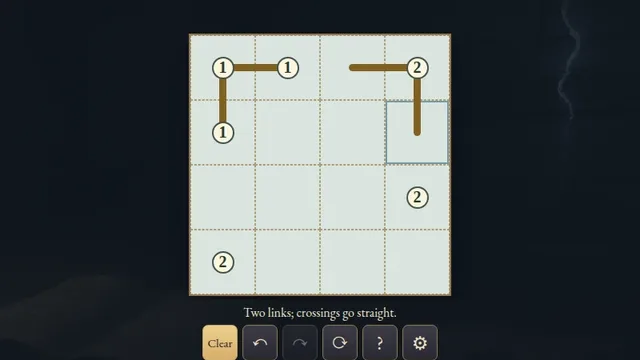
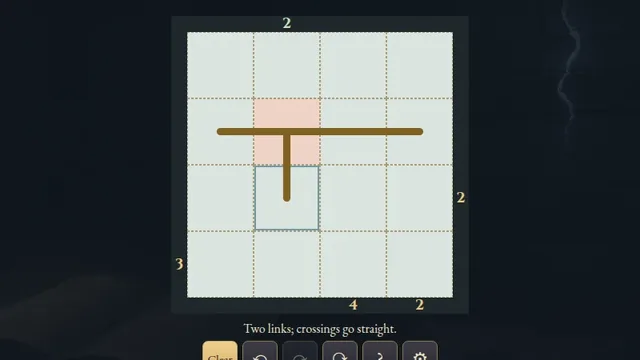
Draw a single closed loop on a paper chart, joining the printed pipe pieces and visiting every square. At a crossing, the two passages continue straight through without turning into each other.
Choose from 2,189 original puzzles across three open shelves, from 4×4 to 6×6. Every puzzle has one answer and can be completed by deduction.
How to play
- Goal
- Join the printed pipes in one loop through every square.
- How it ends
- All pipe ends connect and form a single closed strand. Crossings go straight through.
- Record
- The fastest first unaided solve of each puzzle is recorded.
- Connect neighbouring cell centres by dragging between them, or tap two adjacent squares. Choose Draw, Cross-out or Erase to change the connection.
- Every square must contain a bend, a straight or a crossing. All pipe ends must connect within the chart.
- Keep each printed pipe’s entire shape. A printed bend or straight can never gain a third connection.
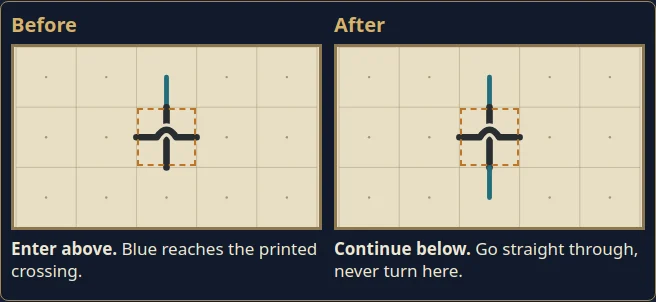
- At a crossing, north connects to south and east connects to west. The two passages never turn into each other.
- Make one closed strand through every square. Separate loops do not finish the chart; cross-out marks are optional notes.
Controls
| Input | Action |
|---|---|
| Drag between cell centres, or tap two adjacent squares | Edit one connection or a continuous stroke |
| Draw / Cross-out / Erase | Choose the connection mark |
| Arrows; Shift + arrow | Move the cursor; edit a connection |
| Enter / Space | Choose the two endpoints |
| D / X / E | Choose Draw / Cross-out / Erase |
| Z / Y / R | Undo / Redo / open Restart confirmation |
| Escape | Cancel a stroke, close a dialog or return to the atlas |
| D-pad + A | Move the controller cursor and choose endpoints |
| X; shoulders; Y / View; Start | Cycle tools; Undo / Redo; rules; chart menu |
Tips
- Follow each passage Trace a crossing straight through before deciding whether the strand returns to itself.
- Keep the loop open Closing a smaller loop too soon strands the other squares.
Good to know
Progress and Undo history save in this browser. The first clock starts on chart selection and continues through menus and Restart. Reloads, clock changes or browser suspension make an attempt local only. Practice keeps the original finish. Music and sound effects have separate switches.
Watch how to play
Questions
Can a crossing turn?
No. Each passage goes straight through: north–south and east–west. They belong to the same loop but do not join inside that square.
Can I extend a printed bend into a crossing?
No. A printed piece fixes its whole shape. You may only connect to its printed ends.
Do I need every cross-out mark?
No. Cross-outs are optional notes. Only the completed pipe loop is required.