About Mirror of Changes
A spot-the-difference game in twenty painted rooms, from a hedge-wizard's study and apothecary to a castle kitchen, a witch's cottage, an old crypt and a village tavern. Each scene shows a cluttered shelf or desk beside the same view in an enchanted mirror that has changed five to nine things.
A curio may be missing, swapped, recoloured, turned round, resized or moved; nothing else differs. Some mirrors reverse the room, and in candlelight scenes only your candle lights the pictures. Every scene keeps a Top 10 for the fastest clear and one for the fewest misses, set on its first try.
How to play
- Goal
- Find every change the mirror has made to the room.
- How it ends
- A scene is cleared when its last change is found; it cannot be lost, but every wrong tap adds five seconds more than the one before and every hint thirty.
- Record
- The fastest clear and the fewest wrong taps of each scene's first try.
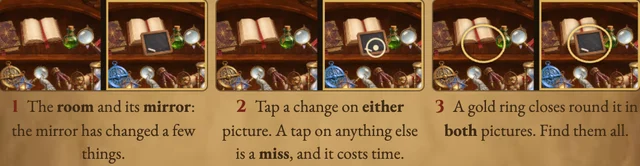
- Each scene shows a corner of a room and the same corner in a mirror that has changed a few things. Tap each change, on either picture; a tap just beside it still finds it, and a gold ring closes round it in both pictures. The counter shows how many changes the scene holds. The clock starts when the pictures appear and stops at the last find.
- Drag to look around, and pinch, use the wheel or the plus and minus buttons to zoom: both pictures move together. The first wrong tap adds five seconds and each later one five more than the last, so tapping everywhere costs more than looking. The magnifying glass is the hint: it rings a change you have not found and adds thirty seconds.
- In mirror scenes the second picture is the room reversed, left for right. In candlelight scenes only the patch around your candle is lit, the same spot in both pictures: it follows the pointer, and on a phone a tap in the dark carries it there without counting as a miss. Only a scene's first try can set a record; later tries are practice for your own best.
Controls
| Input | Action |
|---|---|
| Tap or click | Mark the change under your finger, on either picture |
| Drag, pinch, wheel | Look around and zoom both pictures |
| Arrow keys | Move the magnifier (Shift for big steps) |
| Enter · Space | Mark the change under the magnifier |
| + · − | Zoom |
| H | Hint (adds thirty seconds) |
| R · Escape | Start the scene again · Pause |
Good to know
Ranked results are checked by replaying your taps. Your progress stays in this browser.