About Thermal Seams
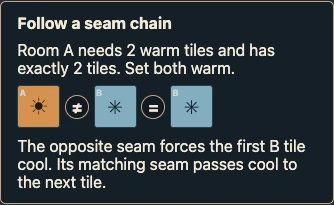
The observatory has twelve floors to balance. Every lettered room needs a specific number of warm tiles. Some seams require neighboring tiles to match, while others demand opposite temperatures. Follow seam chains to see how a clue in one room can settle the tiles in another.
How to play
- Goal
- Set each tile warm or cool to match every room's warm-tile count and every marked seam.
- How it ends
- A floor is complete when every tile is set and every clue agrees, and you can revise settings until then.
- Record
- Your fastest first clear is recorded for each floor.
- Choose Warm or Cool and tap a tile. Use Clear to return it to unset. Each room lists the current number of warm tiles, the target and the unset count.
- Tiles across an = seam must match. Tiles across a ≠ seam must be opposite. Plain edges carry no rule.
- If a clue shows a conflict, revise a tile or use Undo. A floor clears once all tiles are set and every clue agrees.
Controls
| Input | Action |
|---|---|
| Touch or mouse | Choose Warm, Cool or Clear, then tap or click a tile. |
| Keyboard | Move among tiles with the arrows. Enter or Space uses the tool. W, C and Delete set the focused tile directly. |
| Gamepad | Move focus with the D-pad. A activates, B goes back and Y opens the rules. |
Good to know
Timing starts when you open a floor. Restart clears its tiles and keeps the original start time. Reloaded drafts can be finished in practice.