About Manifest Switch
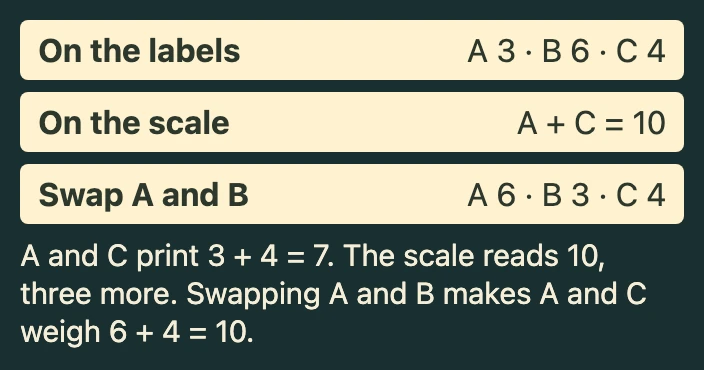
The dock scales weighed the freight correctly, but the crate labels were switched. Compare what each group should weigh with the total on its scale slip.
Find the swapped labels across ten cases. Later manifests need two separate swaps, and their effects can cancel on a slip that already matches.
How to play
- Goal
- Swap the crate labels so every recorded scale reading agrees with the manifest.
- How it ends
- A case clears when all readings match and the required swaps have been made.
- Record
- Each case records the fastest first clear submitted without a wrong seal.
- Select a scale slip to highlight the crates in its weighing. Compare the printed total with the scale reading.
- Select two crates to exchange their weights in the draft. Select either paired crate to undo that swap. A crate can be used in only one pair.
- Seal the manifest once every reading fits. A wrong seal makes the rest of that case practice.
Controls
| Input | Action |
|---|---|
| Tap or click | Select a slip or a crate. Use Undo to take back the last edit. |
| Keyboard | Move focus with Tab or the arrow keys. Use Enter or Space to select, and Escape to go back. |
| Controller | Move with the directional pad. Use A to select, B to go back, and Start to pause. |
Tips
- Check the size of the difference If only one crate in a group changes weight, the difference tells you how much heavier or lighter its partner must be.
- Keep the matching slips A swap within the same weighing keeps its total. In a two-swap case, one change can also cancel the other.