About Tide Tallies
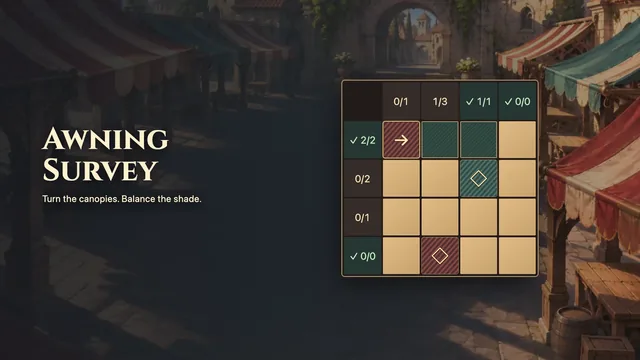
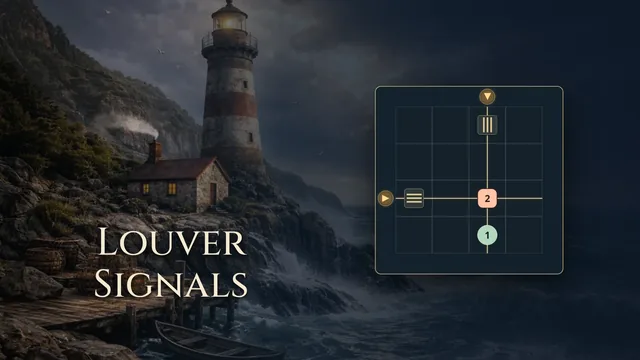
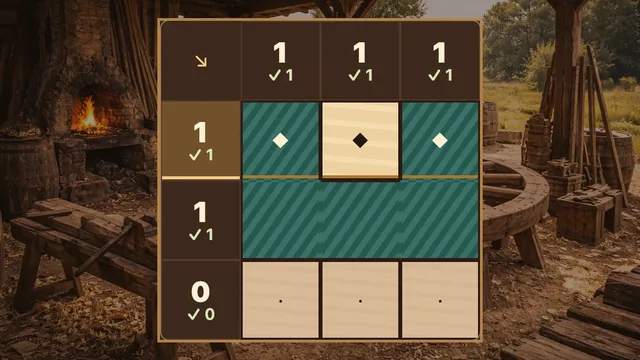
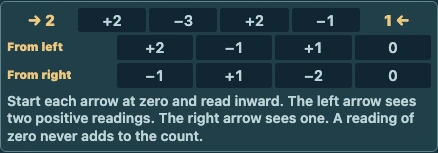
Set tide tiles to rise or fall on charts with fixed anchors. Starting from zero, follow an arrow and add or subtract each tile as you cross it. The clue counts the times that running total is above zero.
An arrow at the other end reads the same tiles in reverse, so the two counts can differ. Work through 45 charts in Harbour, Channel and Open water.
How to play
- Goal
- Set every tide tile so each arrow counts exactly its printed number of above-zero readings.
- How it ends
- Match every arrow on a filled chart to clear it, with as many corrections as you need.
- Record
- Each chart keeps your first solve time, and eligible first solves can enter its time standings.
- Tap a tide tile to cycle up, down and blank. Diamond anchors stay fixed.
- Start each arrow at zero and work inward. Count one reading every time the running total is above zero.
- Tap an arrow to inspect its running totals. A blank stops the preview at that tile.
- Press Check when every tile has a sign and every arrow matches.
Controls
| Input | Action |
|---|---|
| Mouse or touch | Tap tiles to change their signs and arrows to inspect their readings. Undo takes back a change. |
| Keyboard | Use Tab to move focus and Enter or Space to activate. On a tile, use plus, minus or Delete to set its sign directly. |
| Controller | Use the D-pad to move focus, A to select, B to cancel, and Start to pause. |
Tips
- Read the other way An arrow on the far edge starts its own count at zero. Compare clues crossing the same tiles.
- Check an anchor first A fixed positive tile next to an arrow contributes its first above-zero reading.