About Cam Index
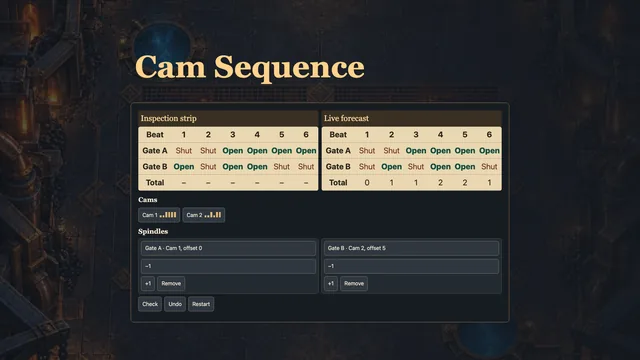
Four stops, stepped brass cams and a gauge that watches two wheels at a time. Slide each cam’s heights around the cycle to match the readings on a calibration card.
Start with one Lift gauge. Later cards add Gap gauges and share cams across both types, so a turn can fix one reading while shifting several others.
How to play
- Goal
- Rotate the cams until every gauge matches its target at every stop.
- How it ends
- A card clears when all its readings match, and you can keep adjusting until they do.
- Record
- Your fastest first clear on each card is recorded.
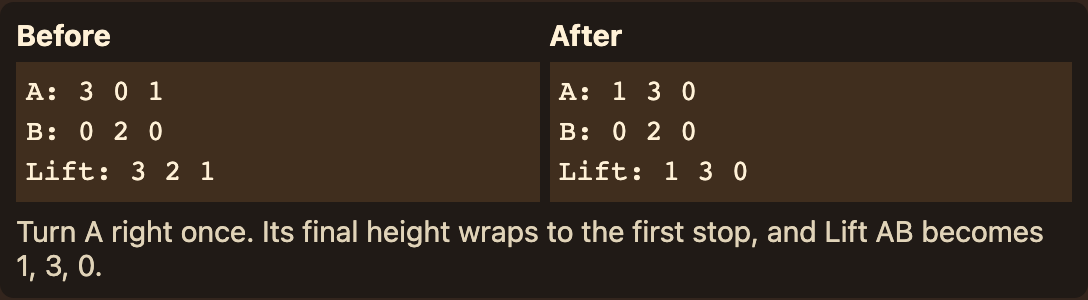
- Use either arrow next to a cam to shift its row by one stop. A height leaving one edge wraps to the other. Fixed stop numbers keep the cam rows and gauge readings aligned.
- Lift reads the higher of two cams. Gap reads the difference. Compare each current reading with the target after the slash, then select Check card when they all match.
Controls
| Input | Action |
|---|---|
| Mouse or touch | Tap a turn arrow next to a cam. Tap a stop number to inspect its readings. |
| Keyboard | Use Tab to move focus and Enter or Space to activate. Ctrl+Z or Command+Z reverses a turn. |
| Gamepad | Move focus with the directional pad and use A to activate. B goes back, and the left bumper reverses a turn. |
Tips
- Start with an extreme A Lift reading of three requires at least one cam with height three at that stop.
- Follow shared cams Test a cam against both gauges that use it before deciding how far to turn it.
Good to know
The clock starts when you open a card and continues through restarts. Reopened drafts and later clears are practice.