About Ferry Ledger
The harbor has one channel and a ledger full of departures. Pick a marked bell for each ferry and watch its crossing fill the timetable. Opposite traffic needs separate time, while boats going the same way can share the channel.
Begin with two ferries and work up to seven. Later ledgers close the channel for a bell, so a departure can be inside its window and still send a ferry into closed water.
How to play
- Goal
- Schedule every ferry within its departure window and keep opposite crossings from overlapping in the channel.
- How it ends
- The ledger clears when every crossing fits the tide and traffic rules, and you can keep adjusting the plan until it does.
- Record
- Your fastest eligible first clear is recorded for each ledger.
- Select a ferry and choose a marked departure bell. The arrow starts its crossing, and the ribbon shows every bell it occupies. Every departure bell holds one start.
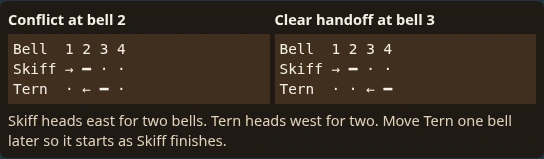
- Keep opposite directions apart and leave all hatched bells empty. Boats going the same way may cross together. Use Check ledger to locate the first conflict.
Controls
| Input | Action |
|---|---|
| Mouse or touch | Select a ferry, then tap a departure bell. |
| Keyboard | Tab between controls and use Enter or Space to activate. Ctrl+Z or Command+Z undoes an edit. |
| Gamepad | Use the directional pad to move and A to activate. B goes back, Start opens the menu and the left bumper undoes an edit. |
Tips
- Start with tight windows Place a ferry with only one option before trying the wider departure windows.
- Send a convoy Overlapping crossings in the same direction can leave room for ferries heading the other way.
Good to know
The clock starts when you open a ledger and keeps running through restarts. Reopened drafts and later clears are practice.