About Torn Chorus
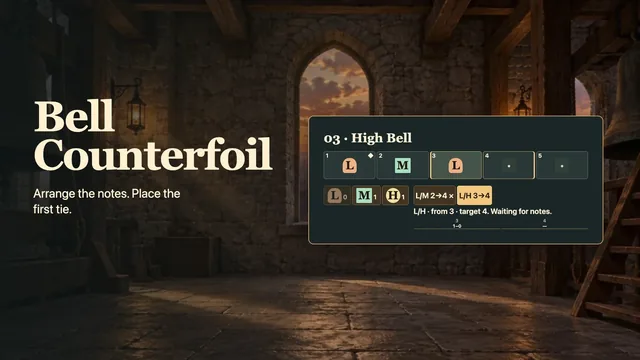
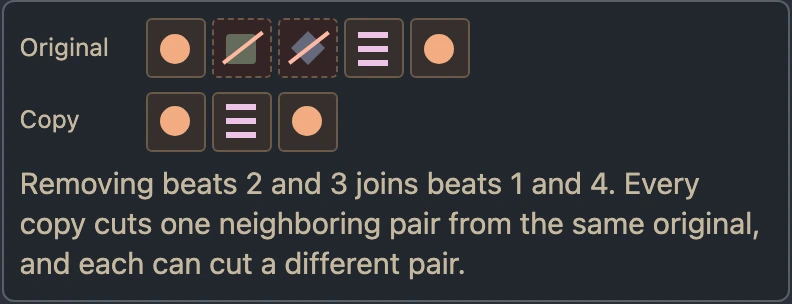
Two neighboring beats were cut out of every copy of a rhythm strip. The rest of each copy stayed in order. Put the drum, clack, chime and shake marks back into the original strip so every copy can be made.
Start with five beats and two copies. Later strips have up to nine beats and three overlapping copies. The marks have distinct shapes and names, so you can play with the sound off.
How to play
- Goal
- Fill the original strip so every copy can be made by cutting out two neighboring beats and joining the ends.
- How it ends
- A strip clears when you check a complete line that accounts for every copy. You can keep editing after a wrong check.
- Record
- Your first clear time is saved for each strip.
- Select an empty beat or tap any beat you want to change. Choose a mark from the palette. The next blank is selected automatically.
- Each copy may cut a different pair. A cut can remove the first two beats, the last two beats or any neighboring pair between.
- Choose Check when the strip is full. The result shows where each copy can make its cut.
Controls
| Input | Action |
|---|---|
| Mouse or touch | Choose a slot and tap a beat mark. Use × to erase and Check to test the strip. |
| Keyboard | Tab or use the arrow keys to move focus. Press Enter or Space to activate. |
| Controller | Move focus with the D-pad. Press A to select, B to go back, Start for Settings and Y for the rules. |
Tips
- Look for a shared stretch If two copies have a distinctive matching run, try aligning it before deciding which pair was cut.
- Test the cut Once you place one copy, check whether another could result from a single two-beat deletion. Two separate gaps do not count.