About Tetoron
Divide the whole mosaic into connected four-cell pieces. Every piece carries two different symbols, and every repeated shape must carry the same pair—even when turned or reflected.
Explore 96 original charts in four open rectangular sizes, from 4×4 to 6×8. Draw by taps or strokes, lift a whole piece to revise it, and keep your first solve time for each chart.
How to play
- Goal
- Divide every cell into connected four-cell regions, each containing exactly two different symbols, with matching shapes carrying matching symbol pairs.
- How it ends
- A chart is complete when every cell belongs to a valid region; there is no loss.
- Record
- Your first solve time is kept per chart, alongside the fastest verified first solve and its holder.
- Every cell belongs to one connected region of exactly four cells. Cells connect along horizontal or vertical edges. All five tetromino shapes, including the square, are legal.
- Each piece contains exactly two printed symbols, and those symbols must be different. Its other two cells have no printed symbol.
- Pieces with the same shape carry the same unordered pair of symbols. Turning or reflecting a piece does not change its shape. Different shapes may share a symbol pair.
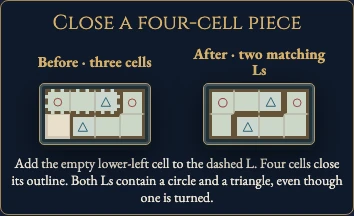
- Choose Draw, then tap or drag adjoining unclaimed cells. A dashed outline shows a partial piece; its fourth cell seals the piece and starts a fresh one.
- Erase lifts the whole touched piece. Lift or Delete removes the selected piece. Undo and Redo reverse a whole stroke. Pan moves a large chart; Whole chart gives a read-only overview.
- The first clock starts when you open a chart and never pauses, including through menus, Restart and reloads. Restart clears pieces while keeping that clock. Later replays are Practice and preserve your first finish.
Controls
| Input | Action |
|---|---|
| Draw, then tap or drag | Join four adjoining unclaimed cells into a piece |
| Erase, then tap / Lift / Delete | Remove a whole piece |
| Arrows / Space / Enter | Move focus / apply the chosen tool |
| D / E / P | Choose Draw / Erase / Pan without editing |
| Z / Y / R | Undo / Redo / open Restart confirmation |
| Escape | Close a dialog or return to the atlas |
Tips
- Count printed marks A region needs exactly two marks, of different types. Two copies of the same mark cannot share a piece.
- Compare repeated shapes A turned or reflected L still uses the pair established by every other L on that chart.
- Leave room for the remaining cells A proposed piece must leave every other cell room to join a four-cell piece with two different symbols.
Good to know
Progress, partial pieces and Undo save in this browser. The first clock starts when a chart opens and never pauses. Reloaded or unsafe attempts stay local. Practice preserves the first finish. Named records appear on this game page.
Watch how to play
Questions
May different shapes use the same symbols?
Yes. A circle and triangle may appear together in both an L and a square. Matching shapes must share a pair; a pair does not identify only one shape.
Do turns and reflections count as the same shape?
Yes. There are five free tetromino families: I, O, T, L and S.
Are square pieces allowed?
Yes. A 2×2 square is a legal four-cell piece.
Why did a cell refuse to join my piece?
Draw adds only unclaimed cells sharing an edge with the current partial piece. Complete that piece or erase it before starting elsewhere.
Can I undo a whole stroke?
Yes. Undo and Redo preserve stroke boundaries, including after reload.
Does Restart reset the clock?
No. The first clock keeps running; Practice cannot replace your first finish.