How to play
- Goal
- Place blocks along every arrow: each next block keeps the previous shape and adds one square, without turning or flipping.
- How it ends
- Every editable cell is Square or Empty, every block contains exactly one arrow cell, and every arrow has at least two growing blocks; there is no loss state.
- Record
- Each chart keeps your first solve time, and an uninterrupted first solve can claim the named fastest time.
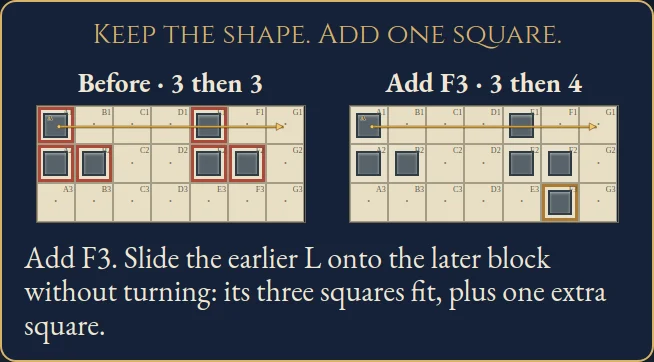
- Side-connected squares form a block. Corner contacts do not join blocks. Every block must contain exactly one cell belonging to an arrow path.
- Follow each arrow from its round tail to its pointed head. It must visit at least two separate blocks. Each next block contains the previous shape in the same orientation, plus exactly one extra square. Turning and flipping are forbidden.
- The first block can have any positive size. Arrow cells need not occupy the same relative position in consecutive blocks. Empty white cells are allowed.
- Blocked tiles stay empty and fixed squares stay occupied. Mark every editable white cell Square or Empty. Select a cell to inspect its arrow and current blocks.
Controls
| Mouse / touch | Select Square, Empty or Erase; tap a tile or drag one undoable stroke. Tap a matching mark again to erase it. |
|---|---|
| Arrows + Enter / Space | Move cell focus and mark with the selected tool |
| X / E / Delete | Mark Empty / erase the focused cell |
| Z / Y / R | Undo / Redo / open Restart confirmation |
| Pan / P | Drag the chart without painting |
| Whole chart | Open a read-only overview from the chart menu |
| Escape | Cancel a stroke, close a dialog or return to the atlas |
| Controller | D-pad move; A mark; X Empty; shoulders Undo/Redo; B back; Start settings |
Tips for Evolomino
- Count the blocks Consecutive blocks grow by exactly one square. A first block of three must be followed by four.
- Keep the orientation Slide the earlier shape over the later block in your mind. All its squares must fit without turning or flipping.
- Watch arrow cells Joining two arrow cells into one block cannot work, even when they belong to different arrows.
Questions about this game
Must every white tile contain a square?
No. Empty white tiles are allowed, but every editable tile needs an explicit Square or Empty mark before finishing.
Does the first block always have one square?
No. It can have any positive size.
Do diagonal squares join?
No. Blocks use side connections only.
Are the shelves difficulty levels?
They describe chart sizes: eight 4×4, sixteen 5×4, twenty-four 5×5 and forty-eight 6×5. No difficulty ranking is promised.
Does Restart reset the clock?
No. It clears your marks and keeps the original first-solve clock. Undo restores the cleared marks.
What happens when I replay or reload?
Completed charts open in untimed Practice and preserve their first finish. Reloaded unfinished charts retain marks and Undo, and their time stays local.
Charts and the worked example are original. Marks and Undo save in this browser. The first clock starts when a chart is selected. Reloaded attempts and detected clock or browser-suspension discontinuities stay local. Unsafe or unavailable storage is reported in-game. This is an independent implementation of the classic Evolomino puzzle rules.
Watch how to play
About Evolomino
G
r
o
w
s
q
u
a
r
e
-
c
e
l
l
b
l
o
c
k
s
a
l
o
n
g
o
r
d
e
r
e
d
a
r
r
o
w
s
.
E
a
c
h
l
a
t
e
r
b
l
o
c
k
k
e
e
p
s
t
h
e
p
r
e
v
i
o
u
s
s
h
a
p
e
w
i
t
h
o
u
t
t
u
r
n
i
n
g
o
r
f
l
i
p
p
i
n
g
a
n
d
a
d
d
s
e
x
a
c
t
l
y
o
n
e
s
q
u
a
r
e
,
a
c
r
o
s
s
9
6
o
r
i
g
i
n
a
l
c
h
a
r
t
s
w
i
t
h
u
n
i
q
u
e
e
n
d
i
n
g
s
.