How to play
- Goal
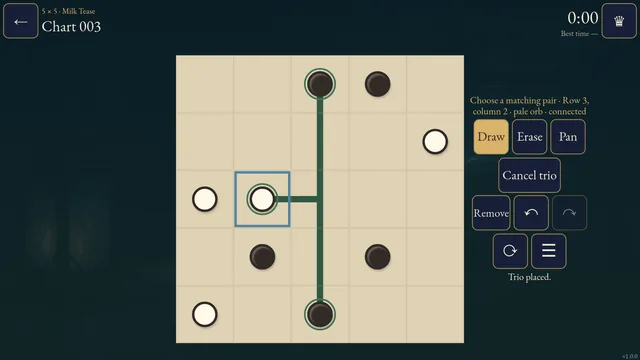
- Connect every bird in a pair, matching the number of distinct territories visited.
- How it ends
- Every bird is an endpoint of an uncrossed route, all territory counts match, and no route re-enters a territory. Unused cells are allowed.
- Record
- Your first uninterrupted unaided completion time is kept for each chart; completed charts reopen as untimed practice.
- Tap a free bird, then adjacent cells and a compatible partner, or drag the route. Every bird belongs to exactly one route. Routes cannot cross, branch, share a cell or pass through another bird.
- Two printed numbers must match. A blank bird, shown as a dot, accepts any printed number or another blank bird. A number counts distinct territories visited, including the starting territory.
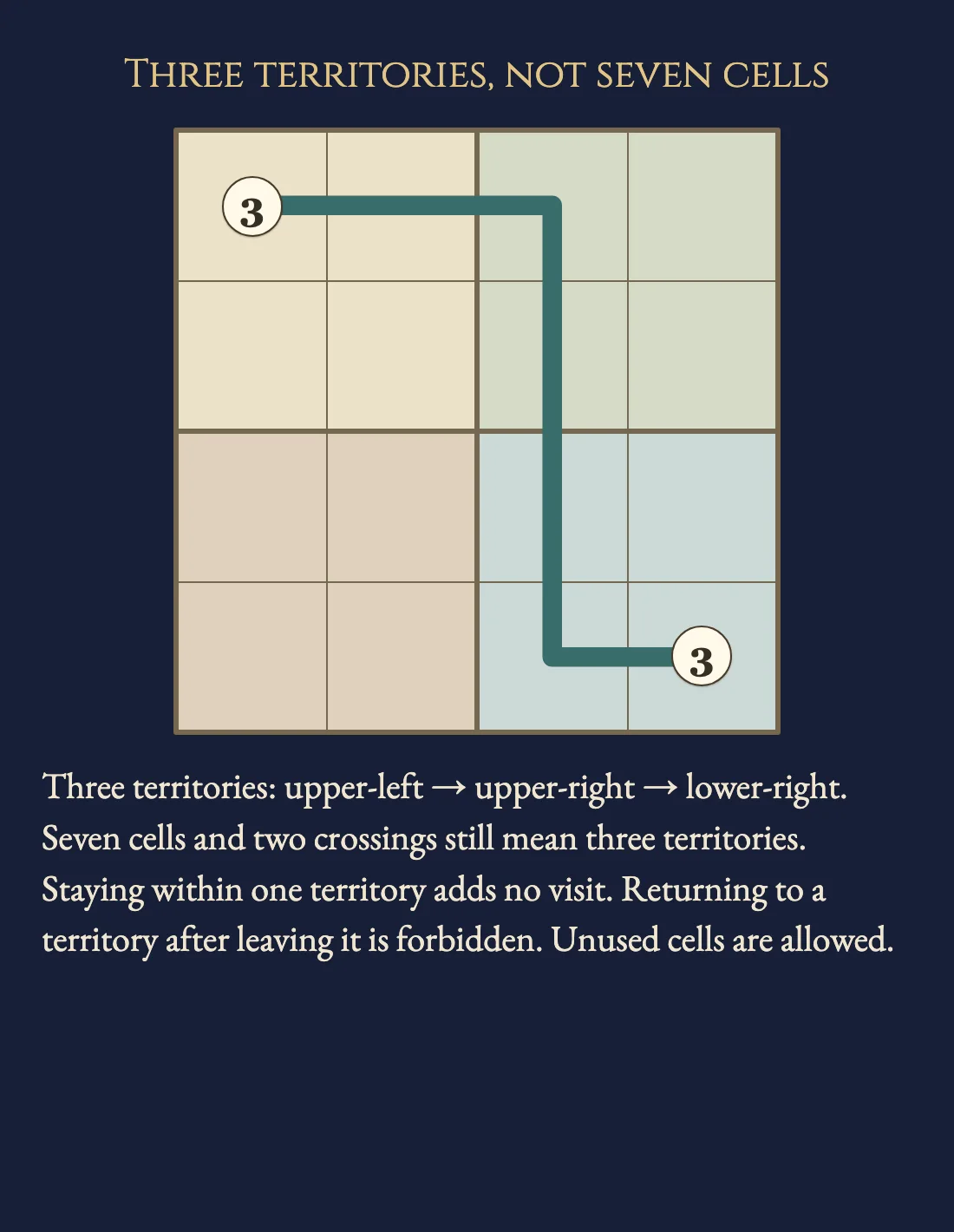
- Thick borders separate territories. Several consecutive cells in the same territory count once. After leaving a territory, a route cannot return to it. Unused cells are allowed.
- A provisional route remains a draft until its partner is reached. Backtrack retracts the draft; Remove deletes an entire settled route. Each completed route is one Undo step.
Controls
| Tap / click / drag | Start at a free bird and extend through adjacent cells to a partner |
|---|---|
| Arrows + Enter / Space | Move the cell cursor and extend the route |
| Backtrack / Backspace | Retract the unfinished draft |
| Remove / Delete | Remove the selected settled route |
| Z / Y / R | Undo / Redo / open Restart confirmation |
| Pan / P | Move a large chart without changing entries |
| Whole chart | Open a read-only overview from the chart menu |
| Escape | Cancel a stroke or draft, close a dialog or return to the atlas |
| Controller | D-pad move; A extend; X backtrack/remove; Y Undo; shoulders Draw/Pan; B back; Start settings |
Tips for Wataridori
- Count territories, not cells The worked route takes seven cells through three territories. Moving farther within one territory does not increase its count.
- Respect thick borders Similar fills do not merge territories. Their bold shared border identifies the separation.
- Check the selected route Selecting a settled route shows its computed visit sequence. A red route can be removed or corrected with Undo.
Questions about this game
Must I fill every cell?
No. Every bird must be paired, but unused cells are allowed.
What does the dot bird mean?
It has no printed count. Its route follows its numbered partner’s count, if there is one. Two dot birds have no count requirement.
Can a route visit the same territory twice?
No. Staying within a territory is allowed; returning after leaving it is forbidden.
Are shelves difficulty levels?
They describe four sizes, from 5×5 to 8×8, with 24 charts each. No human difficulty ranking is promised.
Does Restart reset the clock?
It clears entries while retaining the original first-solve clock. Undo restores the cleared position.
What happens on replay or reload?
Completed charts open in untimed Practice. Reloaded unfinished charts retain completed route entries and Undo; their time stays local.
Charts and the worked example are original. Completed routes and Undo save in this browser; unfinished drafts do not. The first clock starts when a chart is selected. Reloaded attempts and detected clock or browser-suspension discontinuities stay local. Unsafe or unavailable storage is reported in-game. This is an independent implementation of Wataridori puzzle rules.
Watch how to play
About Wataridori
C
o
n
n
e
c
t
b
i
r
d
p
a
i
r
s
w
i
t
h
u
n
c
r
o
s
s
e
d
r
o
u
t
e
s
a
c
r
o
s
s
9
6
o
r
i
g
i
n
a
l
t
e
r
r
i
t
o
r
y
c
h
a
r
t
s
.
M
a
t
c
h
t
h
e
n
u
m
b
e
r
o
f
d
i
s
t
i
n
c
t
t
e
r
r
i
t
o
r
i
e
s
v
i
s
i
t
e
d
,
w
i
t
h
o
u
t
r
e
t
u
r
n
i
n
g
t
o
o
n
e
a
f
t
e
r
l
e
a
v
i
n
g
i
t
.