Settings opens from the title screen or the pause menu. Its five pages are tabs along the top; on a pad, L1 and R1 turn the pages. Restore every default puts every setting and control back as the game shipped them.
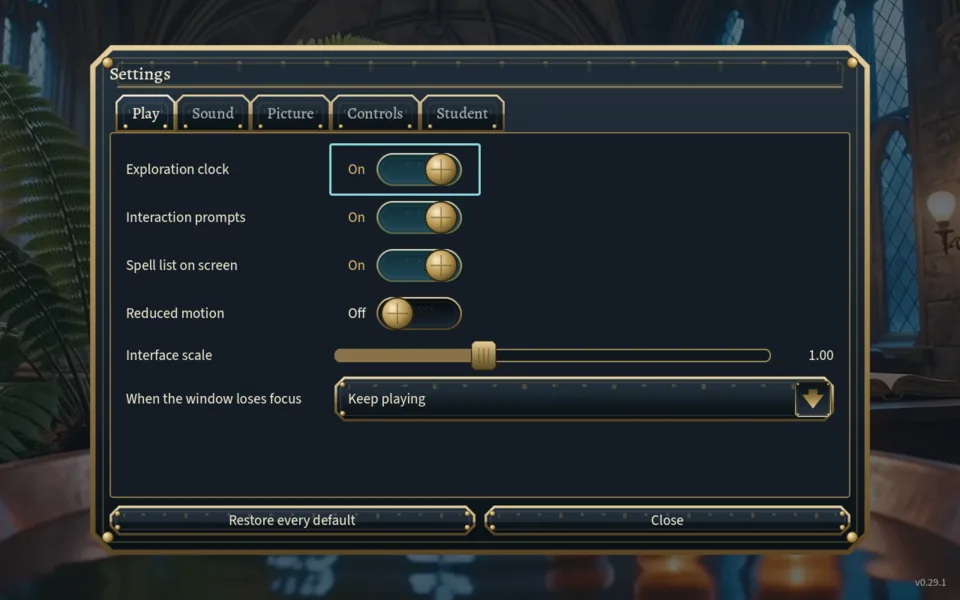
Play
| Row | Choices | Default |
|---|---|---|
| Exploration clock | On / Off: the time walked on the room card | On |
| Interaction prompts | On / Off: the key hints and the card under the crosshair | On |
| Spell list on screen | On / Off (also L in play) | On |
| Reduced motion | On / Off: also stills the title screen's moving background | Off |
| Interface scale | 0.80 to 1.40 | 1.00 |
| When the window loses focus | Pause the game / Mute the sound / Keep playing | Pause the game |
Sound
Four sliders: Master (default 0.9), Effects (1.0), Rooms and ambience (0.8) and Music (0.7). The page itself notes that no sound is needed to solve any room.
Picture
| Row | Choices | Default |
|---|---|---|
| Display | Windowed / Borderless / Fullscreen | Windowed |
| Window size | The display's own size, then those of 2560×1440, 1920×1080, 1600×900, 1366×768 and 1280×800 that fit; only when Windowed | Native |
| Vertical sync | On / Off | On |
| Frame cap | As fast as it will go / 30 / 60 / 120 / 144 fps | As fast as it will go |
| Brightness | 0.60 to 1.60, with a five-swatch shadow-detail strip to judge it by | 1.00 |
| Field of view | 65 to 100 | 78 |
Controls
Look sensitivity and Controller look speed (0.4 to 2.5, default 1.0) and Invert vertical look (default Off). Below them, one button per action rebinds its key: click it, press the new key, and the game confirms “Hurry” is now Shift.
A modifier key on its own is refused, and Pause always stays on Esc because it is the way out of this page. Restore the shipped controls undoes every rebinding. The arrow keys keep walking and the numpad keeps casting unless you give those keys to another action. The three Studies orb rows belong to the game's internal teaching studies and do nothing in the university.
Student
Choose how your student looks, with a live preview. Every appearance has the same movement and spells. The ten choices: Man · Initiate (default), Man · Journeyman, Man · Arcane student, Man · Pyromancy student, Man · Prefect, Woman · Traveller, Woman · Herbalism student, Woman · Arcane student, Woman · Storm scholar and Woman · Storm acolyte.