Open Options from the title menu or the pause menu (Esc in a run). Move between rows with ↑↓ or Tab, set a level with ←→, or click.
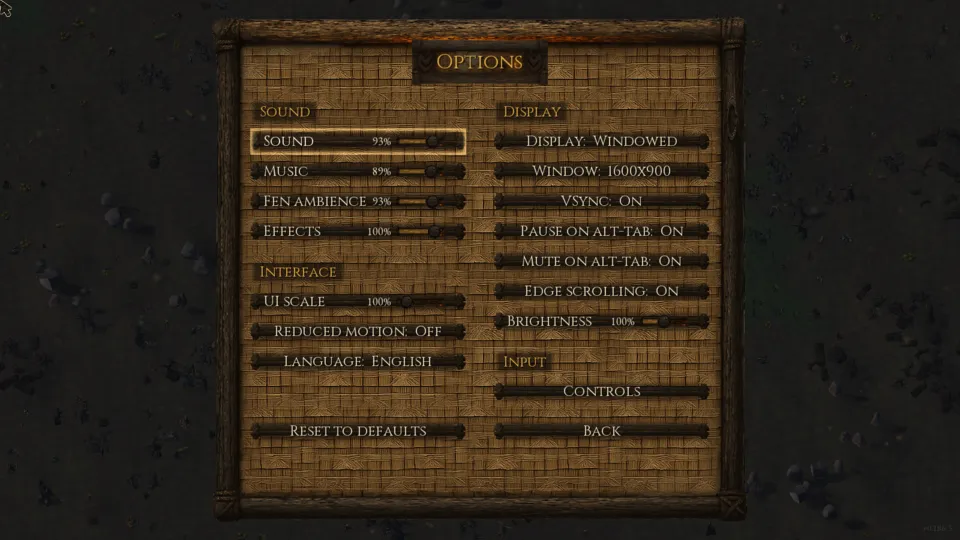
Sound
- Sound, Music, Fen ambience, Effects
- Four faders from 0 to 100%. They start at 93, 89, 93 and 100%.
Interface
- UI scale
- 100, 110, 120 or 130%.
- Reduced motion
- On or Off; starts Off.
- Language
- Opens the language list: English or Čeština. Every language but English is machine-translated and then corrected by hand.
Display
- Display
- Windowed, Borderless or Fullscreen; starts Windowed.
- Window
- 1280×720, 1600×900, 1920×1080 or 2560×1440; starts at 1600×900. Not offered in fullscreen.
- VSync
- On or Off; starts On.
- Pause on alt-tab, Mute on alt-tab
- Whether leaving the window pauses the run and silences it. Both start On.
- Edge scrolling
- Whether the pointer at the screen's edge pans the fen. Starts On.
- Brightness
- 50 to 150%; starts at 100%.
Input
- Controls
- Opens the Controls page, where a click on a row rebinds it. Reset keys puts every key back; the full list is on Gameplay.
Reset to defaults at the bottom puts every row back as it was on a first launch.